
PUBG Cheats in 2026: What You Get, What You Need and How to Choose
A plain look at what a PUBG cheat package contains, what you need to run it on PC, and how to choose a plan that fits how you play.
PUBG is a game of information. Where the next circle lands, who is sitting behind that rock, whether the squad across the bridge already cracked the airdrop. Most people who look into PUBG cheats are not chasing a magic button. They want to know more than the lobby around them. This guide covers what a PUBG cheat package contains, what you need to run one on PC, and how to pick a plan without wasting money.
What a PUBG cheat includes
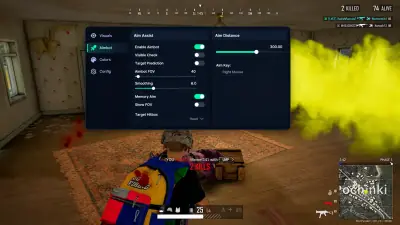
The PUBG cheat on our product page is built around visuals, with 47 modules split into four groups.
Player visuals
Player ESP is the core. You can draw boxes in 2D, corner or filled styles, show health as text or a bar, and add skeletons, knocked status, equipment, weapon, ammo, snaplines, kill score and level. Distance and a max distance setting keep the screen readable, and an enemy only filter removes teammates from the picture. There is also a visible check and an option to show AI bots.
Loot visuals
Loot ESP comes with a filter, so you are not staring at every item on the map. Categories include armor, blades, pistols, submachine guns, shotguns, rifles, snipers, scopes, medicine, attachments and grenades. If you only care about a Level 3 vest and a high power scope, you can set it up that way.
World visuals
Vehicles can be shown with health and fuel info. Airdrops and their contents, corpses and their contents, and thrown grenades are also covered.
Misc options
A crosshair, a spectators option, combat mode and combat filter, color settings and an English or Russian interface. The Misc group also lists an HWID spoofer option, an AWS option and a Cloud DMA option.
What you need to run it
The product page states Windows 10 or 11 64 bit as the platform. It also states that Cloud DMA is required for full functionality. We cover that in a separate guide on PUBG DMA cheats and Cloud DMA, so read it before you pay if you are unsure about your setup.
Always check the live status page before launching, especially after a PUBG patch or an anti cheat update. Status on the product page is a snapshot, not a promise.
How to choose
Start with what you actually want out of it. If you mostly want awareness, meaning enemy positions, loot and airdrop timing, the feature list above covers that well. If you were hoping for something else, read the module list on the PUBG cheat product page before buying so there are no surprises.
Then pick a plan. There is a 1 week option for testing, a 1 month option and a lifetime option. Our breakdown of weekly, monthly and lifetime plans shows how the numbers compare.
Finally, think about support. Updates are free during your key, setup help is included, and you can reset your HWID from the portal if you move to a new PC. If you have been hardware banned before, a HWID Spoofer is sold separately and lists PUBG: Battlegrounds among supported BattlEye games.
A realistic note on risk
No seller can promise a cheat will never be detected. Anti cheat updates change things, and that is exactly why the status page exists. Read what undetected actually means and decide with open eyes.
If the feature list fits what you want, you can check status and pick a plan on the PUBG cheat page.